Turn your rules into real-time decisions
Seeing risk is not enough. You have to be able to stop it. Policy turns your business rules into automatic, real-time decisions on every request: allow, flag or deny, by priority, without writing code.
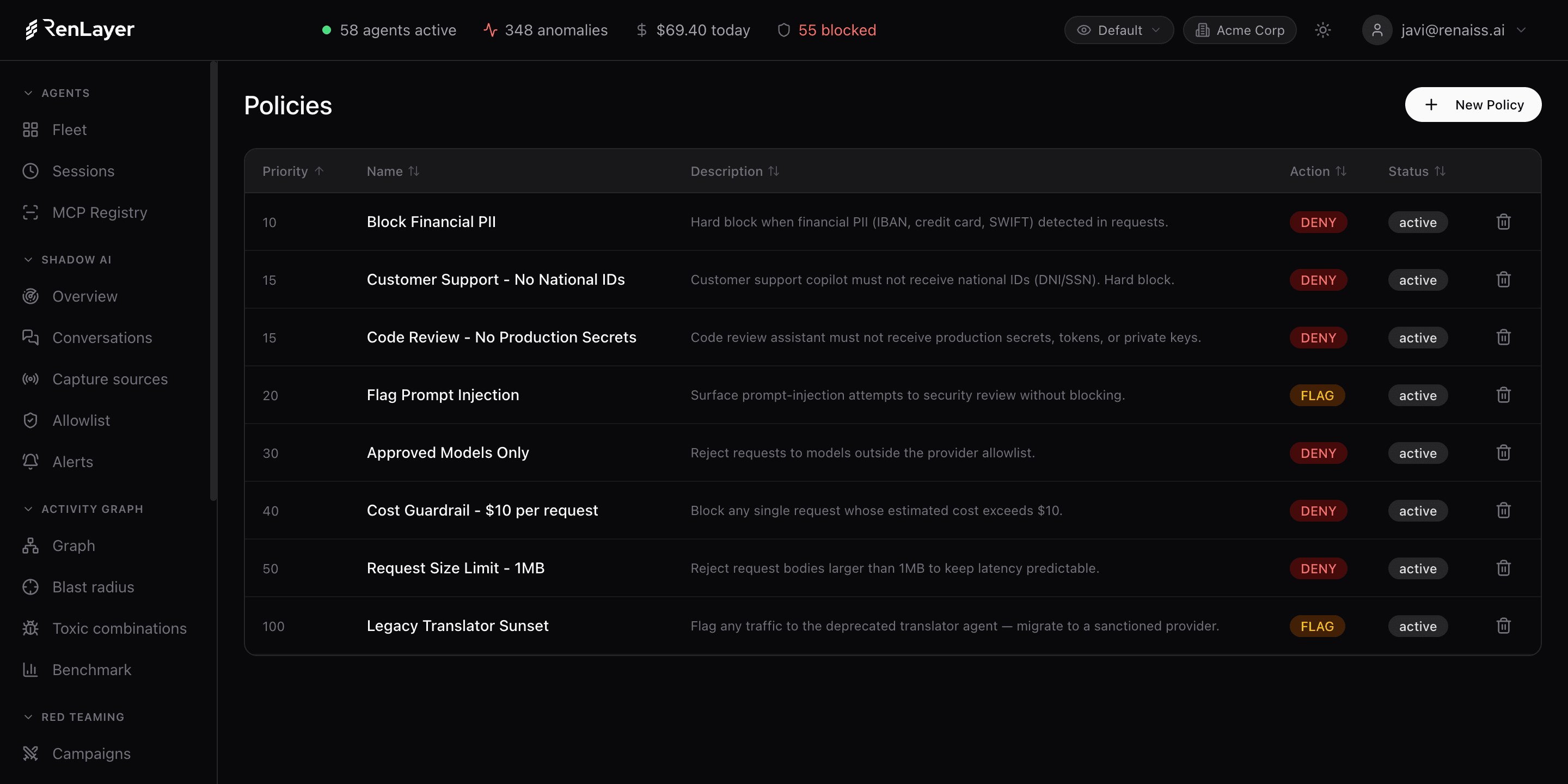
Active control, not just visibility
Policy runs on every request that passes through the RenLayer proxy. Build rules from templates (block PII, control cost, restrict a provider or model, limit request size, flag high-risk responses) or write a custom rule. Each policy has conditions, an action and a priority, and a plain-language summary shows exactly what it will do.
Conditions can match on agent, model, PII type, DLP category or risk level, and actions are ALLOW, FLAG or DENY with a custom message. Start in flag-only mode to see everything without blocking anything, then turn on enforcement where the risk justifies it. You set the pace.
What the policy engine gives you
Policy templates
Start from ready-made templates: cost control, block PII, restrict provider or model, request-size limit and flag high-risk responses.
Rich conditions
Match on agent, model, PII type, DLP category and risk level, alone or combined, to target exactly the traffic you mean.
ALLOW / FLAG / DENY
Three actions with a custom message, so you can permit, observe or block, and tune enforcement per rule.
Priority ordering
Policies evaluate by priority, so specific rules win over general ones and conflicts resolve predictably.
Live policy summary
Every rule renders as a plain-language sentence (who, which providers, which models, under what condition), so intent is auditable at a glance.
Flag-first rollout
Begin in flag-only mode for full visibility with zero friction, then enable blocking exactly where it is warranted.
What a policy can act on
- Templates Cost control, block PII, restrict provider/model, size limit, flag risk, custom Cover the common controls in one click, or compose your own.
- Conditions Agent, model, PII type, DLP category, risk level Combine conditions to scope a policy precisely.
- Actions ALLOW · FLAG · DENY with message and priority Permit, observe or block, evaluated in priority order.
- DLP categories PII, secrets, PHI, national IDs, financial, crypto wallets, custom Policies can act on any DLP category the proxy detects.
- Rollout Flag-only to enforcing Move from visibility to enforcement at your own pace, per rule.
Pick, target, enforce
-
Pick a template
Choose 'block PII' or another template, or start a custom rule, and set the condition.
-
Choose the action
Allow, flag or deny with a custom message, then place it in priority order against your other policies.
-
Enforce on every request
The policy runs inline on every proxied request; pair it with the Activity Graph so a detected toxic combination is blocked automatically.
Frequently asked questions
Do I need to write code to create a policy?
No. Policies are built from templates or a simple condition/action builder in the console. Each renders as a plain-language summary so non-engineers can read and approve them.
Will policies slow my agents down?
Start in flag-only mode and nothing is blocked, so you get full visibility with zero friction. Enforcement adds only single-digit millisecond overhead, and you enable it rule by rule where the risk justifies it.
How do conflicting policies resolve?
Policies evaluate by priority. More specific, higher-priority rules win, so you can layer a broad default under targeted exceptions and get predictable behavior.
What can a policy act on?
Conditions match on agent, model, PII type, DLP category (PII, secrets, PHI, national IDs, financial, crypto, custom) and risk level; actions are allow, flag or deny with a custom message.