See and govern every agent in production
Before you can govern AI you have to see it. Agents gives you a live inventory of every agent, the models it calls, what it costs, and the MCP tools it consumes, with a security audit on every MCP server before an agent is allowed to use it.
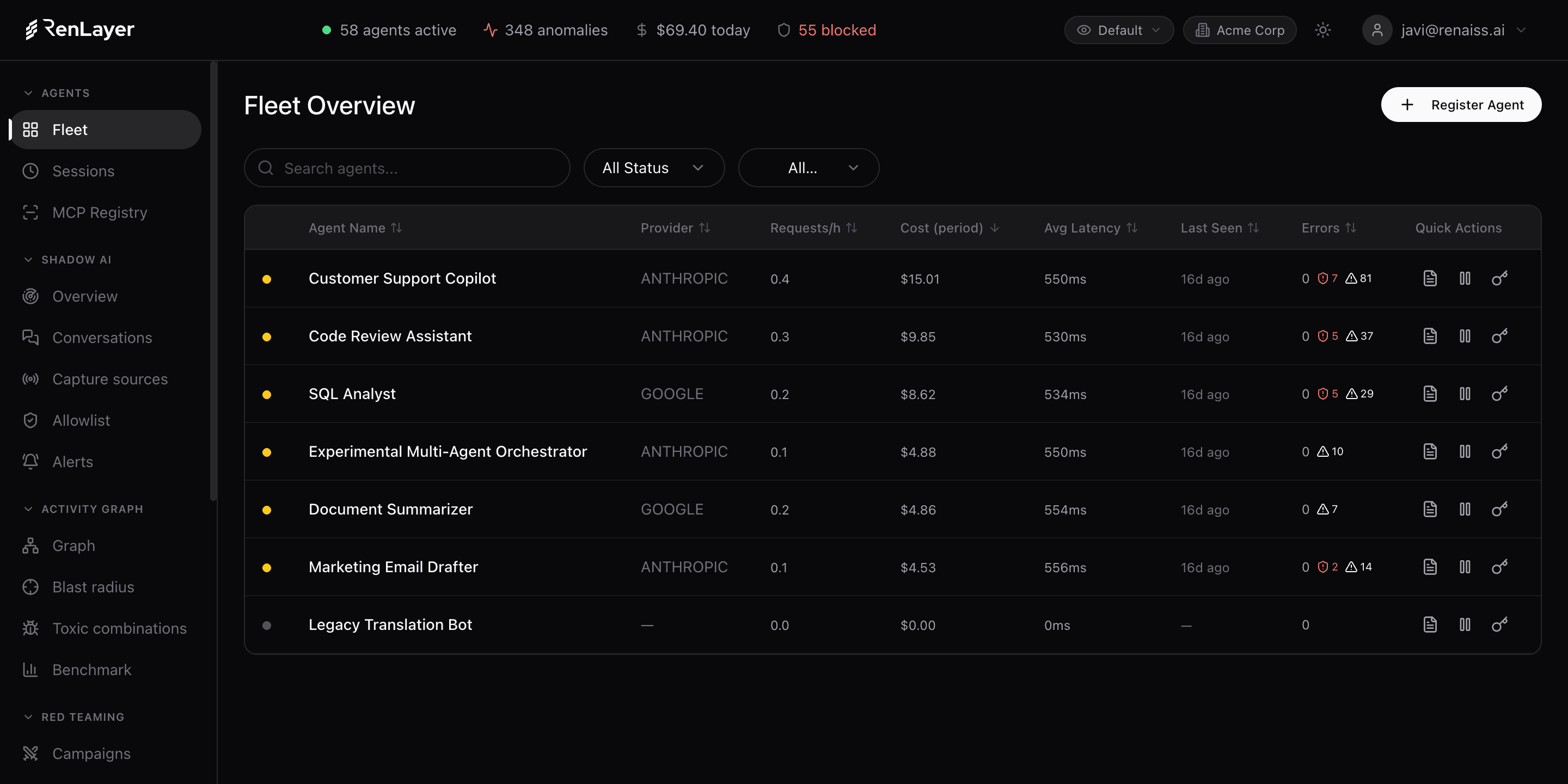
The operational inventory for your agent fleet
Agents is the entry point to the control plane. The Fleet view lists every agent in production with its status, provider, requests per hour, cost for the period, average latency, errors and anomalies, with no sampling and no blind spots. Open any agent to its session timeline and replay every request it made, with tokens, latency and flagged anomalies.
Third-party MCP servers are treated as untrusted until proven safe. The MCP Registry lets you submit any MCP server from GitHub and runs a multi-layer security audit across code, dependencies, secrets and misconfiguration, returning a risk verdict before any agent is allowed to connect.
What Agents gives you
Live fleet overview
Every agent with status (active, flagged, error, inactive), provider, requests/hour, cost, average latency, error rate and anomaly count on one dashboard.
Session timelines
Reconstruct each session as a timeline of requests with tokens, cost, latency and anomalies, so you can see exactly what an agent did and when.
Accurate token & cost attribution
Real token and cost data per agent, team and provider, even when the upstream UI does not expose it, so spend is attributed, not guessed.
MCP Registry & security audit
Submit any MCP server from GitHub and get a risk verdict across dependencies, code, secrets and misconfiguration before an agent connects.
Anomaly detection
Cost spikes, volume spikes, new models and provider switches are flagged automatically against each agent's baseline.
Built-in optimizers
Request compression and prompt-cache optimization cut tokens per request, per agent, without touching code.
EU AI Act classification & correction plan
Classify each agent against the EU AI Act from its repository, a functional description and a guided questionnaire, then turn every obligation and gap into a procedure ready to paste into your management system.
Classify every agent against the EU AI Act and get its correction plan
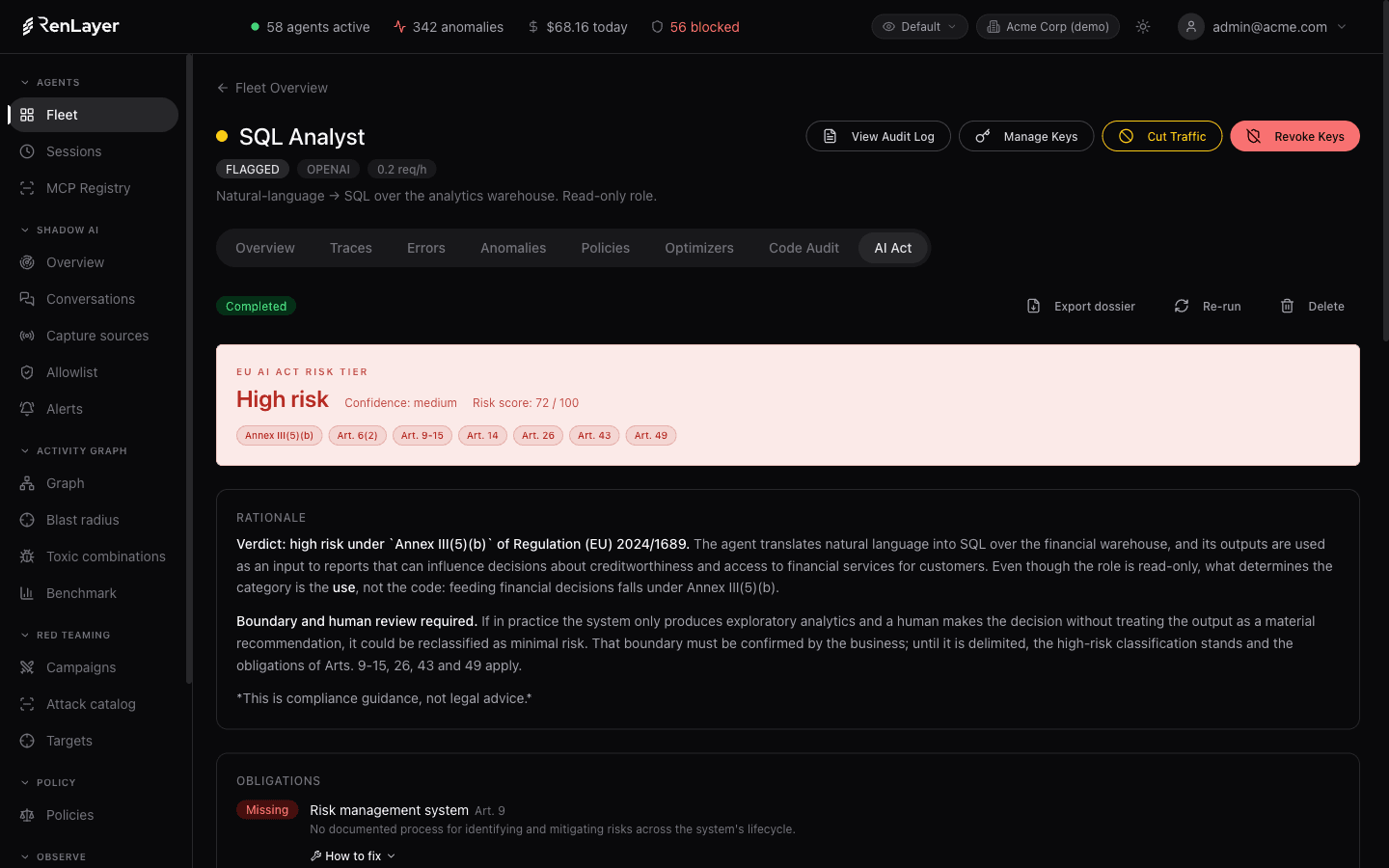
Any agent can be classified against Regulation (EU) 2024/1689 with no manual work. RenLayer starts from the agent's repository, a functional description and a guided questionnaire, and returns a risk study: the tier it belongs to, the rationale cited to the Annex or Article, the list of obligations and the gaps it found. Seeing an agent's risk tier and its rationale is open to anyone, so you can place your agents against the law from day one.
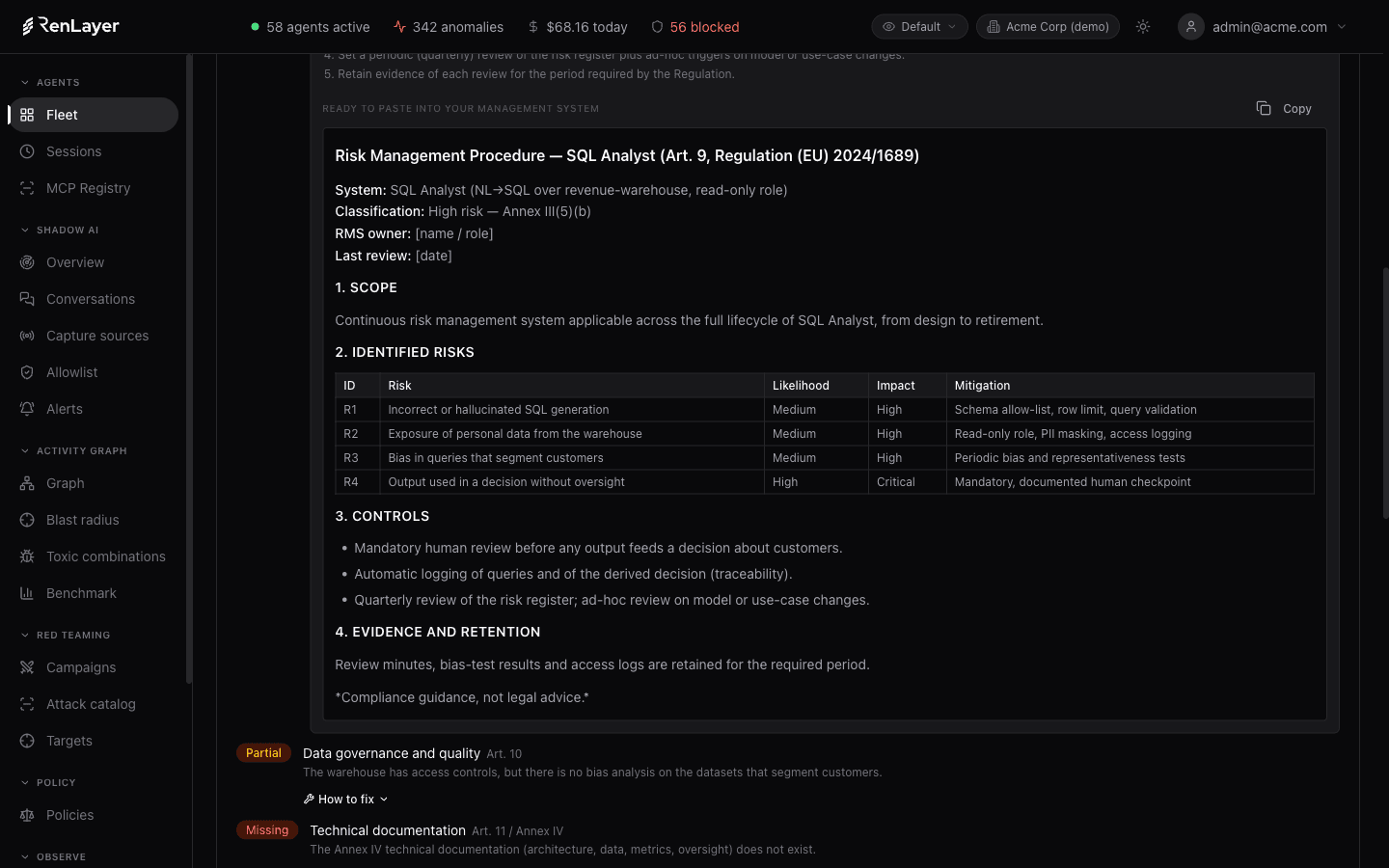
For every obligation and gap it also generates a procedure ready to paste into your management system. The full dossier, with the obligations list, the gaps, the exportable PDF and the correction texts, is included in the higher plans. It is compliance guidance, not legal advice, and borderline cases are flagged for human review.
- Tiers: prohibited, high, limited, minimal, with a confidence level
- Rationale cited to the Annex III category or the Article
- Obligations checklist with met / partial / missing status
- A ready-to-paste correction procedure per obligation and gap
- Exportable PDF compliance dossier
- Open to classify; the full dossier in the higher plans
What the fleet surfaces
- Fleet Status, provider, requests/h, cost, latency, errors, anomalies Per-agent operational metrics refreshed live across the whole fleet.
- Sessions Per-session request timeline with tokens, cost and latency Drill from an agent into any session and into any single request.
- MCP Registry Repository, status, risk, findings, submitted Security audit of third-party MCP servers across code, deps, secrets and misconfig.
- Anomalies Cost spike, volume spike, new model, provider switch Behavioral baselines per agent surface drift the moment it happens.
- Optimizers Request compression, prompt-cache optimization Token reduction applied per agent with no code change.
- AI Act Tier, confidence, obligations, gaps, correction plan EU AI Act classification per agent with a ready-to-paste correction plan and an exportable PDF dossier.
Three steps to a governed fleet
-
Connect your agents
Point your client at the RenLayer proxy. Every agent appears in the Fleet view automatically, with no SDK to install.
-
Audit the MCP servers
Submit each MCP server your agents use from the registry and review its risk verdict before allowing the connection.
-
Watch the fleet
Track cost, latency, errors and anomalies per agent in real time, and drill into any session for a full request timeline.
Frequently asked questions
What counts as an agent?
Any client that calls an LLM through the RenLayer proxy: a registered production agent, a script, or a workflow. Each appears in the Fleet view with its own metrics, sessions and cost attribution.
Do I need an SDK to inventory my agents?
No. Agents are discovered from proxied traffic. You change the base URL and attach a few request headers; the fleet populates itself with status, cost, latency and anomalies.
What does the MCP Registry audit check?
It pulls the MCP server repository at a fixed commit and reviews code, dependencies, secrets, supply-chain risk and misconfiguration, then returns a risk verdict so you can approve or reject the server before an agent connects.
How is cost attributed per agent?
RenLayer records accurate token counts and cost for every request and joins them to the agent, team and department, so spend is attributed precisely instead of estimated from provider invoices.